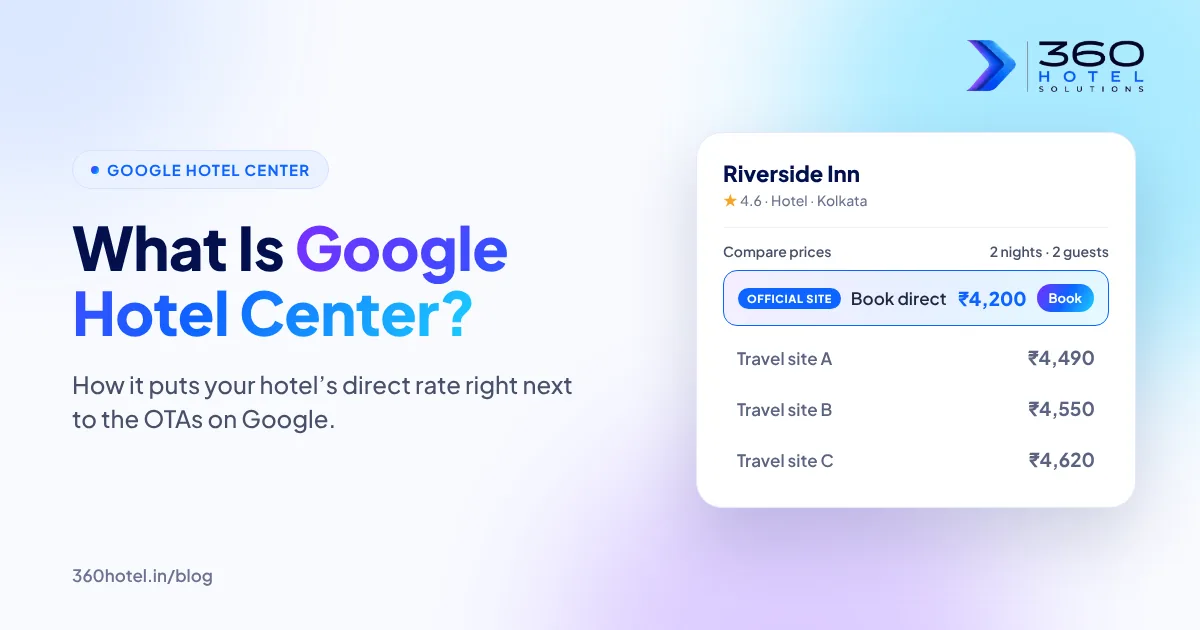
Search any hotel’s name on Google and look at what comes up. Next to the photos and reviews there is usually a small box with dates, prices and a list of places to book: MakeMyTrip, Booking.com, Agoda and others. A guest who already likes your hotel taps one of those links, books, and you pay commission on a guest who was looking for you by name.
There is often one rate missing from that box: yours.
Google Hotel Center is how you add it. In this guide we explain, in plain terms, what Google Hotel Center is, what it costs, what you need before you start, and the mistakes that stop a hotel’s own rate from showing or getting clicked.
What Is Google Hotel Center?
Google Hotel Center is Google’s platform for hotel prices. It is the system that takes room rates and availability from hotels and booking sites and shows them in the price box on Google.
For a hotel owner, the useful way to think about it is this:
- Your booking engine knows your live rates and which rooms are free.
- It sends that information to Google, through a connection Google calls an integration partner.
- Google shows your rate in the price box, often labelled as the official site, right beside the OTAs.
- When a guest taps it, they land on your own booking page and book direct.
You don’t need to visit Hotel Center every day, or even log in to it yourself. In most cases your booking engine provider or a partner like us handles the connection, and you see the results as direct bookings.
It is also not the same as your Google Business Profile. Your Business Profile is the listing itself: name, photos, reviews, address and phone. Hotel Center is what puts prices on that listing. You need both, and the details on each must match.
Where Your Rate Shows Up On Google
Once your rates are connected, they can appear wherever Google shows hotel prices:
- Google Search, in the price box on your hotel’s listing when someone searches your name.
- Google Maps, when travellers look at hotels on the map or near a place they’re visiting.
- Google Travel, where people compare hotels and plan trips.
The important point is the timing. A guest who searches your hotel by name is already close to booking. They are deciding where to book, not whether. If your own rate isn’t in the box, the decision is made for them.
Free Booking Links vs Hotel Ads
There are two ways your rate can appear in that box.
Free booking links are unpaid listings. According to Google’s own help page on free booking links, partners pay no fee for them and pay nothing for clicks. Google ranks them on how useful they are to the traveller, looking at things like the landing page experience and how accurate your prices have been. You can’t pay to move up.
Hotel Ads are paid placements, run through Google Ads. They are ranked through an auction, so you can bid to appear higher in the box. You pay for this placement, and the cost depends on how you bid.
For most independent hotels, the sensible order is:
- Get connected and start with free booking links. There is no cost per click, and it immediately puts your direct rate in front of guests who are searching for you.
- Once you can see how many bookings come through, decide whether Hotel Ads are worth adding for busy dates or competitive locations. That is a business decision, not a requirement.
We cover the paid side in more detail in our post on how Google helps hotels get more direct bookings.
What You Need Before You Start
Google doesn’t take rates from just anyone. Before your direct rate can appear, a few things need to be in place:
- A verified Google Business Profile. The hotel name, address and phone number must be correct, and must match what your booking engine sends to Google.
- A booking engine connected to Google. Google gets rates through integration partners, usually booking engines and channel managers. If yours already has a connection, setup is much quicker. If it doesn’t, this is the step that needs the most thought. Our hotel booking engine page explains what a good one should do.
- Accurate, bookable rates. The price Google shows must be the price the guest sees when they land on your booking page. Google checks this, and listings with price mismatches are shown less.
- A booking page that works on a phone. Most hotel searches happen on mobile. If the page is slow or confusing, guests who tap your rate will go back to the price box and pick an OTA.
How Setup Works, Step By Step
The exact steps depend on your booking engine, but the path usually looks like this:
- Check your Business Profile. Fix the name, address, phone, photos and website link first.
- Confirm the connection. Ask your booking engine provider whether they are a Google integration partner and what they need from you. If they aren’t, plan a move to one that is.
- Map your property. Your hotel in the booking engine is linked to your hotel on Google, so rates land on the right listing.
- Share rates and availability. Your room types, rates and inventory start flowing to Google.
- Price accuracy checks. Google compares the prices it shows with your booking page before and after going live.
- Go live with free booking links. Your rate starts appearing in the price box.
- Watch the results. Track clicks and direct bookings that come from Google, and decide later whether Hotel Ads are worth adding.
This is the work our Google Hotel Center team does for hotels, from checking the profile to monitoring results.
Common Mistakes That Keep Your Rate Hidden Or Unclicked
- Your rate doesn’t match your booking page. Taxes added late, a different room type, or a cached old price all hurt price accuracy, and Google shows inaccurate listings less.
- Your direct rate is higher than the OTAs’. Guests see every price side by side. If an OTA shows your room cheaper, most will book there. Keep your rates in line across channels, and use direct-only perks if you want a reason to book direct.
- The booking page is slow or hard to use. Getting into the price box only helps if the guest can finish the booking in a few taps.
- The website link on Google goes to an OTA. Some profiles still link to an OTA page instead of the hotel’s own site. Fix that first; it costs nothing.
- Nobody checks the results. Free booking links are not set-and-forget. Rates, availability and room details change, and the connection needs someone keeping an eye on it.
Does This Mean Leaving The OTAs?
No. OTAs are still the best way for most independent hotels to reach travellers who have never heard of them, and they will keep appearing in Google’s price box whether you are there or not.
Google Hotel Center changes one thing: it gives guests who already want your hotel the option to book with you directly, at the moment they are comparing prices. Your OTA listings carry on as before. The best results come from running both well: strong OTA listings to be discovered, and a direct rate on Google to win the guests who come looking for you. Our OTA management page covers the OTA side.
Is It Worth It For A Small Hotel?
For most independent hotels, guest houses and resorts, yes, as long as the basics are in place. The free booking links cost nothing per click, and they appear at the point where a guest is choosing where to book a hotel they have already picked.
It is less useful if:
- you don’t have a booking engine yet, or your booking page doesn’t work well on a phone;
- your direct rate is usually higher than your OTA rates;
- nobody on your team can keep rates and availability up to date.
In those cases, fix the foundation first: a working booking engine, sensible rate parity and a clean Google Business Profile. Then connect to Google.
The Short Version
Google Hotel Center puts your hotel’s own rate into the price box guests already use to decide where to book. Free booking links cost nothing per click. To make them work, you need a verified Business Profile, a booking engine connected to Google, accurate rates and a booking page that works on a phone.
Not sure where your hotel stands? Book a free Direct Booking Health Check. In 20 minutes we look at your website, Google listing and WhatsApp replies the way a guest would, and share 3 practical fixes, whether or not you work with us.